Page 1 of 1

Coolmods website cases

PostPosted: Wed Jun 20, 2007 6:02 pm
by staxx
well, after a couple hours of taking my psp apart and reassembling it with the new clear case that i purchased from coolmods...half the stuff doesnt fit too well, wifi switch wont budge, o button is hard to press (due to the crappy half circle cuts for the power switch board to slide in) and a bunch more crap...Anyways, what im trying to say...if your thinking about purchasing a new case for your psp, coolmods isnt the place to go :D

PostPosted: Wed Jun 20, 2007 7:10 pm
by ace
Lol what brand is the faceplate? If it is DGX then thanks for the info because I was just about to order a white DGX faceplate :P Or is the brand coolmods O.o

What is the address of that site anyways? I went to coolmods.com but it went to a blank page...

PostPosted: Thu Jun 21, 2007 2:39 pm
by staxx
Heres a link to the one i bought... http://www.coolmods.co.uk/catalog/produ ... 23b8693a0f

PostPosted: Thu Jun 21, 2007 6:07 pm
by kingcoke
Its not the case mate. My wifi button flips fine. The circle button being hard to press it has something to do with the way you arranged the wire that connects to the charger port.

PostPosted: Fri Jun 22, 2007 11:12 am
by staxx
i know why the o button is hard to press @kingcoke...you know the half circle cuts that the wifi board rests in, they are too thick to allow the wifi board to rest in its proper place. So they end up sitting on top of the cuts made for them instead of the cuts being inside the circle slots on the wifi board (if you follow). thus making everything elevated on the right hand side of the psp and making the o button hard to press. Anyways if you had the same issue and fixed those cuts on yours how did you do it? I'm thinking to sand them down a bit, but im gonna hold off a bit to see how you did it. By the way if you have msn can you send it to my in a pm.

PostPosted: Fri Jun 22, 2007 12:34 pm
by kingcoke
Hmm I think I know what your talking about. The wifiboard/memory reader does not snap into place easily you just have to apply some force and make sure that the headphone jack is in place and just try to snap it in but be careful not to break anything.

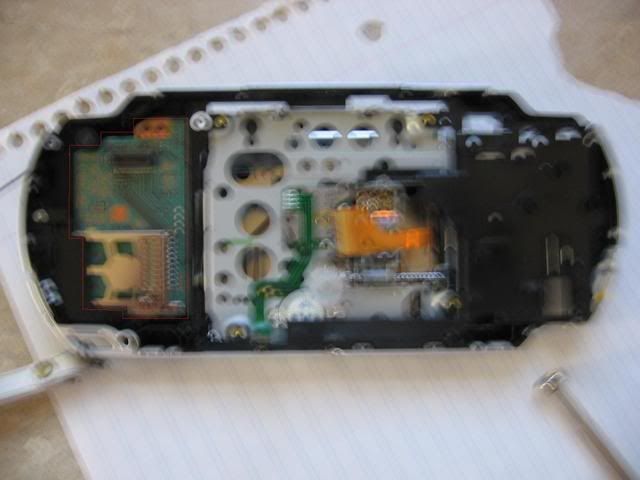
This is what you are talking about correct?
Image
tiny skinny red outline ^^

and what does that have to do with circle being hard to press as its on the complete opposite side.

PostPosted: Fri Jun 22, 2007 2:10 pm
by staxx
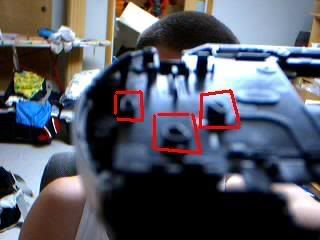
no, sorry i just finished reading a different tutorial and it referred to it as the antennae board not the wifi board (first one i read referred to the wifi as the sister board, and the antennae as the wifi)...its the one on the right side underneath the o, x, etc. buttons. On the case you'll see half circle cuts, those are too thick to allow the antennae board to rest inside. Image

PostPosted: Fri Jun 22, 2007 2:55 pm
by kingcoke
By Antenna board do you mean power board or the little gold piece?

Image

PostPosted: Fri Jun 22, 2007 3:38 pm
by staxx
yup, the gold one in the pic.

PostPosted: Sat Jun 23, 2007 11:31 am
by kingcoke
It did not fit perfectly for me aswell. A little force never hurt anyone :)

PostPosted: Sat Jun 23, 2007 3:37 pm
by DarkPacMan77
kingcoke wrote:A little force never hurt anyone :)


Well she told me to stop so I guess I don't really know.

-DarkPacMan77-

PostPosted: Sun Jun 24, 2007 12:54 am
by staxx
ohhh trust me i tried to force...aint possible for mine, i did however shave the holes a lil bigger on the antennae board, so now they fit...However now my umd drive clicks when i put a umd in it, so now im off to check the gears on that to see if theres any gunk or stuff in it. Does your umd door stay closed good? Mine closes but the little metal latch on the door for the hook to slide behind has a little gap between it and the door so a little tap on the door and the hook pops thru that gap. I swear i'm almost gettin to the point where i'm just gonna send it in for them to do it for me, cause once i get one thing fixed, something else gives trouble lol.