

|
PSPBrew SmashPack Generator
 Overview
Within the next few days, we will be releasing a new version of our one of a kind Pack Generator – the SmashPack Generator. This will give you the ability to choose from a list of all the currently available levels and characters that you want in your version of SmashGpsp. Allowing you to have your own uniqe version of the game, with the characters and levels YOU want, not what the developers want!
Character List
Chrono, Chun Li, Contra, Coolspot, dante, Forte, Goemon, Gold Elite, Guile, Harpuia, Inuyasha, Jack, Link, Luigi (original), Majin Yusuke, Mario (original), Master Chief, Mecha Sonic, Megaman, Megaman Zero, Metool, Moriya, Pacman, Qwest, Retro Link, Riku, Rockman, Samurai Jack, Samus, Shadow, Sonic, Sora, Tails, Trunks, Wolverine, Zero. Level List Dont wan’t to wait for the Generator? Download this file to see what the SmashPack has to offer!
Want to disscuss or get more info on the SmashPack? Visit our forums here.
|
|
| Posted in PSP | No Comments » | |
|
iR Shell is a PSP Shell with al ot of features. Its a multi-tasking switcher, infra-red remote, mp3 player, allows you to transfer files over adhoc WiFi, play games (UMD and homebrew), snap screenshots, etc… iR Shell 3.1 includes support for firmware 1.50, 2.71 with HEN-D, Dark_AleX’s 2.71 SE-C, and DevHook-emulated 1.50/2.71. New features:
Bug fixes:
|
|
| Posted in PSP | No Comments » | |
|
Create Custom PSP Skins
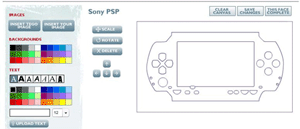 MyTego is now offering a service where you can design our own PSP skin. The custom covers are high quality and precision cut to fit perfectly to your device. They completely cover the surface leaving only the buttons and screen visible. Made of a high quality, extremely durable material, yet thin enough that it will completely conform to the shape of your device, Tego won’t stretch, rip, tear, crack, fall apart, or whatever, when applied. This is easily one of the sweetest and best options for protecting your psp.
Start creating your custom skin now!
|
|
| Posted in PSP | No Comments » | |
|
Great Deals from Sparco and eCost
 eCost.com and Sparco.com are currently sporting some insane deals on Memory Stick Pro Duo cards. eCost is selling the 1GB PRO Duo Gaming Memory Stick for $79.49 with shipping included. Act fast though, as it lasts for only another 45 hours! You can get it now by clicking the link below.
Sparco.com is also offering a completely insane deal on the 2GB PRO Duo Sticks. They are selling at $175.49, and have shipping of $7.56. As of now there are none in stock however, and they have no predicted arrival date. This could be one of those to-good-to-be-true situations, but there is only one way to find out. For those of you with a big wallet, I must say this is a golden opportunity!
You can get the SanDisk 1GB PRO Duo here.
You can get the SanDisk 2GB PRO Duo here.
|
|
| Posted in PSP | No Comments » | |
|
PSP Memory Stick Adapter
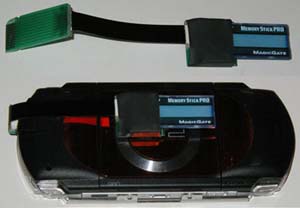 The folks at PSPHardware have released their memory stick adapter which allows the PSP to use all of the standard Sony memory stick formats. They cost $25.00 each and the shipping is $4.00 for priority mail within the US and standard mail outside the US. They test each unit before it is shipped, and offer a 30 day return policy. You can purchase one via this link. They are currently out of stock, but expect to see some more becoming available within the next day or two.
|
|
| Posted in PSP | No Comments » | |
|
HomebrewPSP Converter for the Mac OS X
 RnSKSoftronics has released a new version of their Homebrew PSP Convertor, version 1.1.1 which is compatible with MacOS X 10.4.1 or later. HomebrewPSP Converter is an easy to use drag-and-drop tool to convert Homebrew PSP software for v1.0 PSP’s for use on v1.5 PSPs using the 2 Memory Stick boot method. Simply drag an EBOOT.PBP file to the dropwell and click convert, then choose your save location. HomebrewPSP Converter will save your new, ready to go files in clearly labelled folders.
 ATTENTION MAC AND LINUX USERS! Want an even easier way to put homebrew on your PSP? ATTENTION MAC AND LINUX USERS! Want an even easier way to put homebrew on your PSP? Just use our Pack Generator! Select all of the homebrew and emulators you want from the list, and then select the Zip option at the bottom of the page instead of the Self Extracting one and generate your zip. Now simply extract the file to the root for your PSP and… Voila! All the hombrew and emulators you selected will be on your PSP ready to be played!
|
|
| Posted in PSP | No Comments » | |
|
PSP Hotpot v1.0 Beta 5
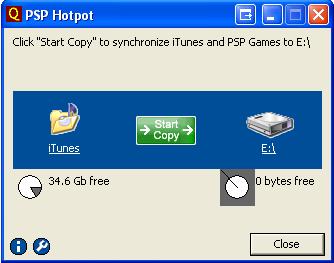 Qrias.com has released a new version of Hotpot. a program made to synchronize your, movies, images, and iTunes songs with your PSP. Hotpot will even convert and compress the quality of the files before they are transferred and also includes a quota to let you know how many files can fit on your memory stick, and at a what quality and size they will be. Changes in beta 5 include:
Split setup for PSP 2.0 and 1.x
+ It’s the same Hotpot software but with different default configuration. + The default configurations have been reviewed to offer speed over space (e.g., MP4 is preferred to MP3 for music encoding). You’ll need to customize the settings again if you’d changed the previous configs. Apologies for any inconvenience caused (really !). I pondered over 2 days for this change but decided to do it while in beta. The MP3 to AAC converter uses iTunes itself to do the conversion. It should be able to handle your needs until I have full QT integration (like 1 month or so). You don’t have to do anything to activate MP3 to AAC conversion, Hotpot will apply it automatically, MP3 -> AAC or AAC -> MP3. 2.0 Support + Internet Favorites can now be synced to PSP 2.0’s bookmark. Existing bookmarks in PSP 2.0 web browser will be preserved. Hotpot will just transfer additional (selected) bookmarks from Windows to PSP. It’s ok to sync many times, since Hotpot prunes duplicated entries away. + Typing History is supported. I hate to use the keypad to type. Hotpot will now transfer every line from the history file "My Documents\PSP Keywords.txt" (if present) to your PSP. This gives you the ability to personalize the typing history to speed up keyboard input. UI Enhancements + Added code to warn users about outdated config file. What’s Next ? |
|
| Posted in PSP | No Comments » | |

|
PSP Air Hockey
 Indianajonesilm has released a new version of his PSP Air Hockey, an extremely fun two-player homebrew which utilizes the D-pad and square/circle for the controls. In this release, indianajonesilm added the following changes:
New Features: Options Menu – Press L Button to enter/exit the options menu.
Available Options:
"Get Ready" now appears on the screen allowing you time to get into position.
Notes:
Future Updates:
|
|
| Posted in PSP | No Comments » | |
|
PSP Mame Version v.97
 TMK has released a new version of his MAME (Multi Arcade Machine Emulator) for the PSP. The changes you are reading in this release are thanks to Google Translations and my best interpretation of what they meant. Thank god for Google and sorry if any of those are incorrect, its hard to translate that stuff.
Release Notes:
Controls:
Get PSP MAME now from our Pack Generator.
|
|
| Posted in PSP | No Comments » | |
|
File Assistant v1.0
Release Notes:
Future Updates:
|
|
| Posted in PSP | No Comments » | |
| « Previous Entries | Next Entries » |