

|
IF YOU USE HOMEBREW ON YOUR Wii, DO NOT UPDATE
IF YOU USE HOMEBREW ON YOUR Wii, DO NOT UPDATE Nintendo has released system menu 4.0 which is now available to install through the Wii’s system update. The new update adds the capability to run Wiiware games off of an SD card without installing on your Wii as well as SDHC support up to 32 GB.
On the homebrew side Nintendo has officially squashed the Twilight Hack bug. If you already have the Homebrew Channel installed it is possible to run it from an SD card but the channel cannot be installed back on the Wii. DVDx apparently still works as well, however if you do not have DVDx or the Homebrew Channel installed before hand you will not be able to install after updating. It is strongly recommended that if you use homebrew and would like to continue that you do not update. |
|
| Posted in Brewology, Wii | No Comments » | |

|
Take this for what you will, but I thought I’d share something I recently stumbled across. I was looking at my ATT account a few weeks ago, and while checking my available minutes I figured I would check to see when I was available for an upgrade. I don’t recall the exact date, but it was definitely around Fall 2010. No big deal, I have an iPhone anyways, and wasn’t planning on upgrading, it was more curiousity than anything. I started skimming my account again today, and checked to see when the other lines on my account were available for upgrade. Then, I noticed something: The date on my upgrade was changed to 7/12/2009. With all of ‘new iPhone’ rumors about, I thought there may be some significance to the change. Any ideas? Feel free to comment, or visit the forums. |
|
| Posted in Brewology, Mobile | No Comments » | |

|
I came across this at the NES-Hacks page and thought I’d share. The new SoftMii is out and it has some great updates you need to check out. There isn’t an updated readme so here are the details we’ve gathered thus far. To download CLICK HERE
-Ability to run GC Backups from the Disc Channel -Updated applications (Preloader v0.28 etc) -SoftMii NAND Browser -NAND Dumper -Bug Fixes are assumed. If you manage to find anything else new, comment on this post, and we will update this section. Also, a helpful tip: If you have SoftMii previously installed, you can install this newer version of SoftMii without uninstalling your previous version. Just start the installation instructions (included in the download) from Phase 3.
|
|
| Posted in Brewology, Wii | No Comments » | |

|
This is by far one of the best (not easiest) homebrew apps for the Wii.
The app formally known as RiskMiimod has been released in a full blown 1.0 ALPHA version.
This has been tested and confirmed working, but please make sure you know what you’re doing before you attempt this.
SoftMii is capable of doing the following:
v1.0 Alpha Features:
-Custom System Menu Alpha
For all questions, comments, and concerns please visit the forums.
|
|
| Posted in Brewology, Wii | No Comments » | |

|
Not only was the 9520 Storm introduced, but the 8200 was as well, the 8200 being a 3G HSDPA Pearl Flip with WiFi and GPS built in AND a second video camera for video calling!!!!!!” Source: Crackberry
Well Merry Christmas to you Canada dwellers as well. Through Rogers you soon will be able to receive a BlackBerry Storm model for yourself….that includes Wi-Fi! Im starting to get a little jealous over the Wi-Fi
|
|
| Posted in Brewology, Mobile | No Comments » | |
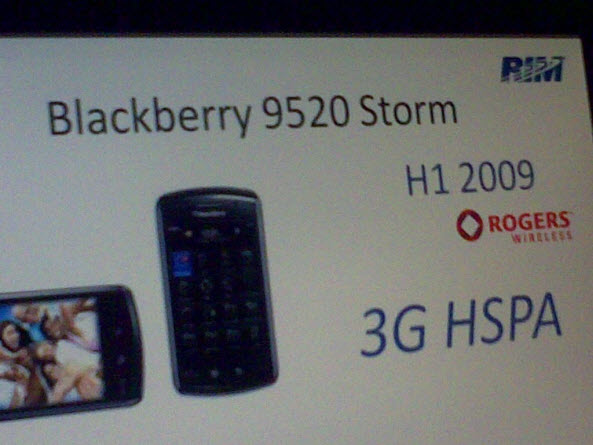
 . Once you get it though, you will love the storm just as I love mine.
 |
The wait is almost over. Straight from the dev-team’s mouth, the iPhone 3G has been successfully unlocked through SOFTWARE, just like the original iPhone. The updated unlocking tools are set to hit the net new year’s eve. Maybe your new year’s resolution will be to try every cellular network you possibly can with your iPhone. Here’s a bit from the dev-team about the unlock:
|
|
| Posted in Apple, Brewology, Mobile | No Comments » | |

|
Ok, yes, it has been a while since the last time anything Wii related was posted, so I’m throwing some information at you! First up you may have heard, but there is a new revision of the Wii that at this time is unmodifiable. The DVD drive controller chip that is used by modchips to play backups has been completely removed! You can find more information from the original source, as well as photos. Source: WiiNewz
Now, for all you homebrew junkies, there have been tons of releases, and I mean tons! Because of so many releases, I have just made a list of some of the more recent releases that you can find all over the web. Take a gander, and if anything peaks your interest any of ‘brew below shouldn’t be hard too find. As always, if you need any help just head over to the Wii Homebrew forums and post your question!
Loaders Emulators Apps Games OS |
|
| Posted in Brewology, Wii | No Comments » | |

|
Microsoft has reportedly, initiated a new ban wave. Right now there is not lot of details, or information, but if you have a modified DVD firmware we suggest you STAY OFF LIVE, for now. |
|
| Posted in Brewology, XBox | No Comments » | |

|
This tutorial is quoted from WiiNewz.com:
"First, use WiiScrubber to open up the Wii Backup Disc, and extract IOS16-64-v257-prod.wad After that, use Wad Manager v1.3 to install this wad – it is NOT trucha signed, but it IS ('semi') legal, so it WILL install without a prior cIOS. Finally, use Wad Manager that was recoded by Davi92 to work off of IOS16 to install the cIOS_fix (hopefully that is the filename in the included zip – djtaz correct me if I'm wrong), and you are on your way again! From here you can choose to run Waninkoko's downgrader. NOTE: if you are trying to run Any Title Deleter to delete IOS51, you must first obtain copies of at least IOS30 and IOS36 from a Wii game (such as Wii Music or the new Guitar Hero) using the same method with WiiScrubber. From here you can install WiiGator's Backup Loader 0.3 with the corresponding cIOS released with it (v6). More information regarding removing the October 23d update can be found here: A HUGE thank you"
I have uploaded all the necassary tools to use this tutorial. Click the link below.
http://rapidshare.com/files/158782142/WiiWadTools.zip
As always please let us know how this works for you either by commenting in this post or by visiting our forums. Thanks. |
|
| Posted in Brewology, Wii | No Comments » | |
|
Looks like theres been a small breakthrough with the latest firmware. When the Wii 3.4 firmware came out, it disabled multiple homebrew applications from running properly. If you wanted to use the shop channel or the internet browser, you had to update. A patch was released to bypass the update and allow you to use the Shop channel on your current firmware. Here are the instructions and info from the developer.
|
|
| Posted in Brewology, Wii | No Comments » | |
| « Previous Entries | Next Entries » |