

|
Tgames has released StartPatch 3.2.0E. StartPatch is a homebrew application that patches your System Menu with useful hacks like skip updates, etc. Featuring the hacks:
Warning: Anything that edits the NAND in ANY way can brick. Be cautious when using this. [ [ Download ] ] |
|
| Posted in Wii | No Comments » | |
|
Joystiq received some interesting info from a reader today. The source claimed to have taken part in a survey run by Microsoft which featured avatars playing classic arcade games in a virtual arcade setting. If that sounds familiar, you probably played PlayStation Home for 5 minutes (and then never again). |
|
| Posted in Brewology, XBox | No Comments » | |
|
Though Microsoft has been a bit cagey with a solid release date for the upcoming Facebok/Twitter/Last.Fm update for Xbox Live, eagle-eyed UK readers have spotted the phrase “Service launches 17th November 2009″ on the UK Xbox website.
|
|
| Posted in Brewology, XBox | No Comments » | |
|
Team Twiizer member dhewg has posted a great article at hackmii as well as releasing a new installer! Quote:
The changelog: HackMii installer (v0.5):
The Homebrew Channel v1.0.5:
DVDX:
For the full read, visit: Here at hackmii |
||
| Posted in Wii | No Comments » | ||
|
Main Notes: Compatible with the new System menu 4.2! “Get a SD card. If it has a private directory, rename it temporarily, e.g. to “privateold”. Having other saved channels on the same card will screw it up. |
|
| Posted in Wii | No Comments » | |

|
Nintendo firmware version 4.2 DISABLES bannerbomb. It also deletes the homebrew channel. Update at your own risk. Nintendo released the update September 29,2009. -BKF- Just to add to that, there is a exploit out however this updates your boot2 to boot2v4 which means, you cannot downgrade your wii, This part of the upgrade is irreversible and would mean your unable to use some stuff in your wii you would like to. This update also *I think* deletes bootmii as nand, So watch out fellow Wii-Brewers. |
|
| Posted in Wii | No Comments » | |
|
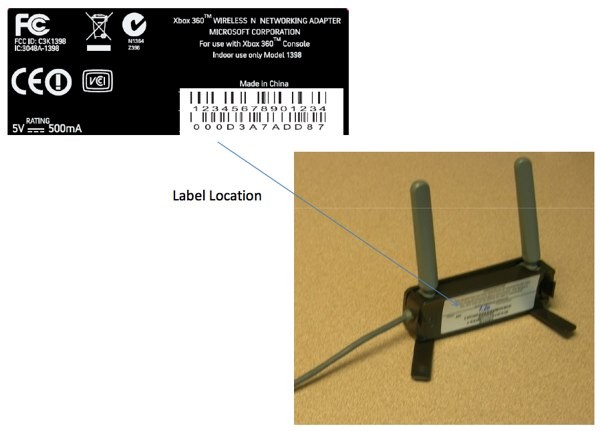
A recently uncovered FCC filing showed Microsoft was set to release a new, updated wireless network adapter for the Xbox 360. Presumably, this would allow users to stream high-definition movies and television shows. The company confirmed today that, yes, there is a new adapter, but details are still under wraps for now. “We can confirm that Xbox 360 will offer a Wireless N Networking Adapter that will enable Xbox 360 owners to seamlessly connect with their home network with the highest wireless ‘N’ technology,” a Microsoft representative told IGN.
|
|
| Posted in Brewology, XBox | No Comments » | |
|
Xbox 360 today announced widespread enthusiasm from the world’s leading video-game publishers for “Project Natal,” a whole new way to play no controller required. Developers across the globe have embraced the technology and have begun work on titles that will deliver extraordinary entertainment experiences for everyone to enjoy. Coming just three months after “Project Natal” was unveiled at E3, the announcements at the Tokyo Game Show underscore the swift industry support for the revolutionary controller-free experiences being developed exclusively for Xbox 360, the premier games and entertainment system. Among the elite publishers actively working on games for “Project Natal” are Activision Blizzard, Bethesda Softworks, CAPCOM, Disney Interactive, Electronic Arts, Konami, MTV Games, Namco Bandai, Sega, Square Enix, THQ Inc. and Ubisoft. Together, these publishers account for more than 70 percent of third-party software sales for this generation of console and most of the world’s most recognized video game franchises. “‘Project Natal’ gives the industry’s creators and storytellers the freedom to dream of new experiences and to tell stories never before possible,” said Don Mattrick, senior vice president for the Interactive Entertainment Business at Microsoft Corp. “The support of these creative partners testifies to the excitement that ‘Project Natal’ is generating among the most innovative minds in the industry, and is proof that Xbox 360 not only offers the best games and entertainment today, but will lead with innovation and new ways to have fun in the future.” Further details of publishers’ new “Project Natal”-inspired projects will be released at a later date. Underscoring the widespread enthusiasm for “Project Natal” among the industry’s top creative forces, Xbox 360 is hosting a high-powered panel at the Tokyo Game Show featuring three acclaimed Japanese industry luminaries: CAPCOM’s Keiji Inafune, creator of “Mega Man” and “Dead Rising,” Sega’s Toshihiro Nagoshi, creator of “Super Monkey Ball,” and Konami’s Hideo Kojima, creator of the “Metal Gear Solid” series. The three developers will discuss the possibilities for the groundbreaking new experiences that can only be achieved with “Project Natal.” Unveiled for the first time in June, “Project Natal” is a code name for a whole new way to play. Combining an RGB camera, depth sensor and multi-array microphone running proprietary software, “Project Natal” enables gamers to play in a natural and inviting new way, free from the boundaries of a controller through the use of sight, sound and motion. Publishers, who received development kits from Microsoft in early June, used the opening of the Tokyo Game Show to voice their excitement about “Project Natal.” “Microsoft ‘Project Natal’ could fundamentally change the way players experience sports games,” said EA Sports President Peter Moore. “At EA, some of our top development teams are experimenting with these tools with the goal of delivering a completely fresh take on genres like sports and racing.” “Activision is encouraged by the innovation that Project Natal will bring to the industry and how it can transform consumers’ video games experience. We have development teams working on Project Natal development kits to explore the creative possibilities this new technology affords,” said Dusty Welch, senior vice president and head of Publishing at Activision/Blizzard. “I strongly feel that ‘Project Natal’ will expand the possibilities of gaming. It’s yet another component that adds to the appeal of Xbox 360 and demonstrates to users the broad level of entertainment it provides,” said Keiji Inafune, managing corporate officer and head of Research & Development Management Group at CAPCOM. “Personally, I too am extremely excited about ‘Project Natal.’ It’s really going to stir up our creative spirits. I think it’s going to bring new ways to play and new surprises to Xbox 360 fans and help further the development of completely original content. ‘Project Natal’ is definitely something people should look out for.” “Ubisoft sees enormous opportunities with ‘Project Natal.’ With the 3-D camera, your body can become the interface,” said Yves Guillemot, chief executive officer of Ubisoft. “Any barrier related to the use of pad controllers that may have existed for potential gamers is now abolished. Ubisoft is already taking advantage of this major evolution to design new types of gaming experiences and attract more people to play video games.” In addition to the broad industry support, Microsoft Game Studios is busy at work creating a diverse slate of experiences that will appeal to a wide variety of entertainment interests. “‘Project Natal’ is enabling our team of developers to create experiences we couldn’t have accomplished before,” said Phil Spencer, corporate vice president, Microsoft Game Studios. “Microsoft Game Studios will help lead the way in bringing ‘Project Natal’ to life.” While laying the foundation for tomorrow with “Project Natal,” Xbox 360 remains the premier device for home entertainment today. Hot new titles for Xbox LIVE Arcade were also unveiled at the Tokyo Game Show, including “Toy Soldiers,” “Snoopy Flying Ace,” “Bomberman Live: Battlefest” and “RayStormHD,” positioning Xbox LIVE Arcade as the premier destination to enjoy the most innovative downloadable games. Xbox 360 is also set to deliver the best new gaming, entertainment and social experiences for consumers this fall. Not only is Xbox 360 home to the most-anticipated exclusive games such as “Halo 3: ODST,” “Forza Motorsport 3,” “Left 4 Dead 2,” and new content from Rockstar Games including the Xbox retail exclusive “Grand Theft Auto: Episodes from Liberty City” featuring “The Ballad of Gay Tony,” which will also be available for download over Xbox LIVE, it will also be the only place to watch instant-on HD in 1080p1 with Zune video, and listen to personalized streaming radio right in the living room with Last.fm on Xbox LIVE. And with new social experiences custom-made for the television, Xbox LIVE continues to offer the most ways of any console to connect and share with friends and family on Facebook, and post tweets on Twitter.2 Additional information about Xbox 360 at the Tokyo Game Show can be found at http://www.xbox.com/en-us/press/2009/tgs. |
|
| Posted in Brewology, XBox | No Comments » | |
|
So can we expect more Xbox 360 games to be patched to support Natal in the future? Not so fast, says Microsoft Game Studios GM and Natal creative director Kudo Tsunoda. Speaking to Destructoid, Tsunoda explained that although Microsoft was able re-engineer older Xbox 360 games to make them compatible with Natal, a hefty chunk of code had to be altered. As such, simply “patching” the game over Xbox Live would not be enough to make older titles work. A publisher would most likely have to completely rewrite the code and then re-release the game. {SOURCE} |
|
| Posted in Brewology, XBox | No Comments » | |

|
So I was reading around the Internet that Custom Firmware 5.00 M33 users were just blocked from accessing the PlayStation Store. Since I have two PSPs I thought I’d check this out for myself… I dug up my old PSP-1000 and upgraded it to 5.00 M33-6 (from 3.90 M33). With that I tried accessing the PSN store and likewise on my PSP-2000, which is already running 5.50 GEN-A. 5.00 M33-6: It’s true. You are now prompted with, “A system software update for the PSP system is required. For update methods, refer to the instructions for the PSP system.” And even with spoofing your version using the ol’ version.txt method — you’re still denied access. 5.50 GEN-A: Keep on… You’re still in business. Silly move on Sony’s part… Why would you ultimately deny money from custom firmware users? I’ve purchased downloads, still do.
{SOURCE} |
|
| Posted in Brewology, PSP | No Comments » | |
| « Previous Entries | Next Entries » |