|
|
 16 PSVita homebrew apps were updated in the Brewology PSVita Store today:
 UMD Player v0.9.15 by xesf
Full Changelog: https://github.com/xesf/umd-player/compare/v0.9.14…v0.9.15
 VitaOS v1.9.0 by mvizensk
VitaOS 1.9.0
Update from Settings > VitaOS > Update, or install VitaOS.vpk with VitaShell over any earlier version. Your settings stay.
Music, films and previews play again
- Songs, films, game previews and the boot video now play on every Vita. The patched player module VitaOS needs (
modules/reAvPlayer.suprx) was left out of every published package from 1.0.0 to 1.8.4, so playback only ever worked on the developer's own consoles. It is now part of the package, and the build refuses to publish without it. (#8, #15)
- VitaOS never rewrites your songs or films. A test on a real Vita showed the player takes hand-copied files as they are: index at the end, cover art stored as a picture track, chapter tracks (audiobooks). So the missing module was the whole problem, and no file "fixing" ships in 1.9.0.
- Apple Lossless and other formats VitaOS can't play now get a message saying what to convert them to, instead of "That file would not play".
- Home music and UI sounds no longer crackle or turn to static. (#24)
- Home music can actually be heard. In 1.8.4 it stayed silent until the first UI sound, because nothing woke the sound mixer once the music was ready, and it was mixed so low that it was barely audible with the volume all the way up. Most people who turned it on probably never heard it. It now starts by itself and is about 10 dB louder (about -11 dBFS at 6/10). Confirmed by ear on a real Vita: it starts without a button press, the level is good, it is clean, and UI clicks are audible over it.
Full release notes in the store
 VivoTube v1.3.4 by hamburger101
What's new
- Sign-in screen: clearer help when Google shows a warning. If Google says it hasn't verified VivoTube, choose Continue. If it says the app is blocked, use your own Google client (see the README).
- Privacy: your Google sign-in is now used only for YouTube's official Data API (your subscriptions, likes and playlists). VivoTube no longer sends it to YouTube's Home feed, which never accepted it anyway. "For you" works as before.
- The privacy policy is updated to match.
About signing in
The built-in Google sign-in is waiting for Google's verification. Until Google approves it, only accounts added as testers can use it, and Google shows everyone else "This app is blocked". In the meantime you can use your own OAuth client; the README explains how (about ten minutes).
Installing
Update from inside VivoTube (side menu → Check for updates), or install VivoTube.vpk with VitaShell.
 Teenage Mutant Ninja Turtles Vita v0.5 by ZekLab
New in this release:
- The left/right area choice on the start screen of a cleared stage is now a menu option, "Stage area choice" (Select + Start). It is off by default.
tmnt_code.so from v0.4 keeps working with this version.
Saves in ux0:data/TMNT2003/ are kept when you install over an older version.
See the README for installation.
If you enjoy the port, you can buy me a coffee.
 Pokemon Colosseum Vita v.1.1 by Rinnegatamante
- Added experimental PAL languages (Italian, French, German, Spanish) support.
- Fixed a bug causing black screens after entering certain rooms in the game.
- Added several more new shaders in the built-in cache: this will make pop-in issues more rare.
- Fixed a memleak that caused, after a certain amount of time, performance losses first and crashes further in.
- Fixed a few rooms causing crashes when attempting to enter them.
- Added a check on boot for CapUnlocker installation to prevent game booting without it.
 THUG2 Vita v1.0.1 by iwannagooutside
First update of THUG2 on PS Vita. It fixes the bugs players reported after v1.0.0 and makes the busiest views noticeably smoother, with exactly the same picture.
Fixes
- Create-A-Skater: hands now match the skater's skin tone (calves and bare torso too), on custom and pre-made skaters (#7).
- Goal givers and pros speak again: goal intros and description boxes are voiced, as on Xbox (#8).
- Tomatoes (and other thrown objects): every press of □ throws, no need to restart the goal any more (#9).
- Story mode: your current chapter is now saved. Loading a save continues where you were, pro teammate and goals included (Boston, #10).
- Level select: story points are kept in the save. Points from a v1.0.0 save come back level by level as you visit them again (#11).
- Memory card loading screen: the purple overlay now covers the whole screen (#12).
Full release notes in the store
 Touhou 12.3 Vita v0.2.0-beta by Botarguirix
Versión final estable (beta) de la recompilación estática. Es el último release de esta línea: el proyecto de recompilación queda en pausa (hold) y no se publicarán más versiones de ella. El trabajo continúa como una reimplementación nativa para PS Vita escrita desde cero, que se publicará aparte cuando esté lista.
Fuentes: main, commit c523d99 (versión interna de pruebas v29). El VPK adjunto se compiló exactamente desde ese commit.
Estado
- Probado en una PS Vita real (FW 3.65) con la configuración de esta versión: arranque, menús, selección y combates completos reproduciendo un replay. Las capturas de esta línea se tomaron sin vsync (
vsync-off.txt).
- Menús a 60 FPS (600 de 600 fotogramas cada 10 s).
- En combate, la lógica del juego corre a 586–600 pasos por cada 10 s (60 FPS = 600), y se dibujan en promedio ~572 fotogramas cada 10 s (~57 FPS), con algunos tirones al empezar las peleas mientras se cargan texturas. No llega a 60 FPS estables en combate.
- El juego en red (adhoc/Wi-Fi) está implementado pero no se ha probado entre dos Vitas.
Mejoras de todo el proyecto
Full release notes in the store
 TNTV v1.0 by T64NCollection
TNTV v1.0 — The New Tetris for PS Vita & PlayStation TV
[](https://github.com/T64NCollection/TNTV) [](https://github.com/T64NCollection/TNTV)
The New Tetris on the go—or with four controllers on the couch. TNTV is an unofficial native port for PS Vita and PlayStation TV (PSTV / Vita TV).
✨ Highlights
- 🎮 Eight optimized solo stages: All seven cultural boards plus Industrial/Finale, extensively tuned for approximately 60 FPS in normal single-player gameplay. Detailed work on skies, animated effects and visual fidelity.
- 👥 Up to four players on PSTV: Real-hardware-tested 2P/3P/4P gameplay using four DualShock 3/4 controllers, with targeting, garbage attacks, Hot Potato and complete results screens.
- 🏛️ Restored Wonders: Construction milestones, progression, 3D WONDERS Hall (including completed/in-progress/locked states), animations and the finale, with persistent unlocks.
- 🎵 Original audio and faithful gameplay: Music and assets reconstructed locally from your ROM, original sound effects, familiar rules, original name-entry cheats and perhaps a hidden surprise.
Full release notes in the store
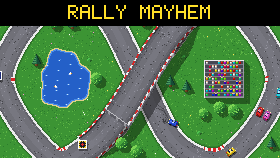 RallyMayhem v1.2.0 by rsn8887
A tiny top-down racing game with 1-5 local players, inspired by Grand Prix Simulator on the Amstrad CPC and Rally Cross Challenge on the Amiga.
Every track fits on a single 320×240 screen. There are 30 tracks with many themes such as summer, spring, city, village and many more. CPU cars fill the grid, collisions are pixel-exact, and bonus items can be fired ahead or behind. Steer with the D-pad, accelerate with A, brake with B, and press Y to put a stuck car back on the track.
Controls
| | Game controller | Keys 1 | Keys 2 | |—|—|—|—| | Steer | D-pad / left stick | Left / Right | A / D | | Accelerate | A (or right trigger) | Space or Right Ctrl | Left Ctrl | | Brake / reverse | B, X (or left trigger) | Right Shift | Left Shift | | Fire weapon ahead | Up | Up | W | | Fire weapon behind | Down | Down | S | | Put car back on track | Y | Backspace | Q | | Pause | Start | Enter | | | Quit | Back | Esc | |
On the title screen press accelerate to join (brake leaves) and pick the track set, laps, CPU cars (ALL fills every free slot, or pick a number, or OFF), the CPU level (easy, normal, hard) and bonus items (on by default) with up/down/left/right. With bonus items on, each pick-up tile shows the weapon it holds. Press accelerate just as the start light turns green for a turbo start. While paused, brake quits the race. On desktop, F11 toggles fullscreen. On the PS Vita the buttons are Cross (accelerate), Circle (brake) and Triangle (reset); on the Switch, + or – pauses.
The 30 tracks are played in sets of five: track set 1 is tracks 1-5, track set 2 is tracks 6-10, and so on, and "complete" plays all 30 in sequence. Each race awards points (10, 6, 4, 2, 1) and is followed by the next track; after the last track of the set the cup winner is shown, and the title screen comes back with the next track set selected.
Credits
- Font: an original 5×7 pixel font, generated by
tools/makefont.py (needs Python with fontTools).
Full release notes in the store
 HE-MAN VITA v1.0 by DominicanNY
Initial release.
- Physical controls: left stick / D-pad to move, face buttons mapped to the game's touch actions and R for "I Have The Power".
- Locked 60 FPS.
- Greatly reduced loading times (create the optional
heman.pak with tools/make_pak.py for the fastest loads).
- Fixed crashes that don't happen on Android.
See the README for setup instructions.
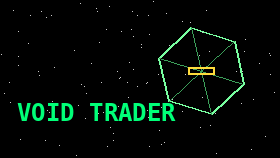 Void Trader v1.5.6 by Syncriel
- Holograms in two styles (item 169, Ultra): a new Settings row, Holograms (row 2, saved). OUTLINE keeps today's place and size; a station shows the outline of its real design (Coriolis, Halo, Outpost, Refinery, Research base, Mining base) with its slot in gold. LIVE lifts the holograms over the dash on a dark backing, fills them in their colours, shows a station as you see it (its spin, your line of sight) with the slot lit or a gold arrow to it, and a caption with the name and distance. Your ship shows its paint.
- The left hologram follows your target (item 178): a selected ship shows its own hull and paint, shield rings and hull damage like yours (red projector if hostile), a rock in its ore's colour, a canister as a box; warp assist switches it to the nav target; with neither it's blank.
- Help prompts (Enhanced and Ultra; Classic keeps its centred line) move to a box over the lower left: below the contacts list's deepest point, above a button row (CAM and room for more), 35 characters wide (with the curved HUD on, the top lines stop short of its arc); parts of a prompt share a line when they fit ("CROSS docking computer"), up to four lines, on a backing plate. The middle stays free for the view and the holograms; the LIVE caption is a short name over the distance.
- The Game tab's "Chat window" row is now "HUD panels": it sets the backing of the contacts list, the chat window and the help box together (50% is as before).
- Settings' "Guide text" row is now "Prompts: FULL / SHORT" (item 75): SHORT keeps just what each button does and drops the advice (e.g. "or fly in below 100 m/s", how to escape an interdiction) and the power key hints; the saved choice carries over (ON = FULL), in every graphics mode.
- UI polish from a regression check of every flight scene, graphics mode and HUD option (11 Nov): the target panel narrows beside the PWR ring (power control in the front corner) and puts the rank by the ship's name, with compact distances; on death the HUD powers down (text, then scanner and gauges, then the dash lights) so "SHIP DESTROYED" stands alone; the chat window's backing fits the lines shown and doesn't appear before they type; names of ships, stations and cargo in the scene no longer slide under the HUD's panels, the dash or Classic's bar; the FPS counter moves to the corner on the station and commander screens.
- Settings has 14 rows (21 px); the two-column menu is item 179.
- Contacts list: the Ships, Rocks and Cargo tabs scroll to keep the selected entry in view (they showed only the first rows, so "+32 more" in a belt could never be reached); the last row counts them ("12-21 of 40"). Every tab now fills the same depth: 10 rocks or canisters (was 8), up to 9 ships. The Cargo tab lists canisters within 30 km, the range you can select them at (was 60).
Full release notes in the store
 Feanor Vita v0.1.0 by MetalSyntax
First playable build of the iOS → PS Vita port of Inotia: Legend of Feanor (iOS 1.0.4), using a native Mach-O loader.
What works
- Intro video (FFmpeg software decode), title screen, menus and gameplay
- Correct colors in the software-rendered view
- Accented text (Spanish and other languages) via a DejaVu Sans fallback font
- 20+ fps: WIPI engine timers now fire on time
- Music and sound effects without cuts
- Saving without crashes
Full release notes in the store
 Vita Storage Manager v1.0 by StaticLift
Vita Storage Manager v1.0
See what fills your PS Vita memory card and free up space safely.
Download: VitaStorageManager.vpk. Install it with VitaShell and turn on Enable Unsafe Homebrew in HENkaku Settings.
What it does
- Sorts everything on
ux0: into PS Vita games, homebrew, PSP games, PS1 games, saved data, media, extra files and system files, with a colour bar for each.
- Shows each game's real name and icon, its size (including updates, DLC and data folders) and when it was last played.
- Uninstalls Vita games and homebrew in one step: the app, its bubble, update, DLC and data folders. Deleting saved data is asked every time and is off by default.
- Links PSP and PS1 games to their Adrenaline bubbles, so a game and its bubble can be removed together. Bubbles left behind by deleted games are listed under Extra Files.
Full release notes in the store
 Zenonia 5 Vita v0.1 by MetalSyntax
Zenonia 5: Wheel of Destiny (PS Vita) — Beta Release v0.1
First public build of the native iOS → PS Vita port of Zenonia 5: Wheel of Destiny (iOS 1.1.3). A custom Mach-O loader runs the original ARMv7 executable; on physical hardware the game boots to the title screen, logs in to an emulated server with a default player ID, reaches the main menu and is playable in-game.
📦 Release Package Contents
zenonia5ios.vpk (PSVZ5I001, version 01.00): the Mach-O loader with its Foundation / UIKit / CoreGraphics / CoreText / AudioToolbox / AVFoundation / OpenAL replacements, vitaGL presentation, FreeType text with a merged Latin + Korean font.ttf, the built-in server emulator and a Zenonia 5 LiveArea (banner, background and startup logo).rebase.bin: relocation table of 33,785 absolute 32-bit pointers for the 1.1.3 Zenonia5 executable (armv7 slice).binds.bin: 2,889 import slots that point into Apple frameworks, resolved by the loader at startup.controls.txt: button → touch mapping for the in-game HUD.
No game code or assets are included.
Full release notes in the store
 Rayman Fiesta Run Vita v0.1 by MetalSyntax
Rayman Fiesta Run (PS Vita) — Beta Release v0.1
First public build of the native iOS → PS Vita port of Rayman Fiesta Run (iOS 1.2.3). A custom Mach-O loader and Objective-C runtime run the original ARMv7 executable; on physical hardware the game boots to the main menu and the world map, and plays levels with music, touch and working saves.
📦 Release Package Contents
raymanfiesta.vpk (PSVRFR001, version 01.00): the Mach-O loader with its Foundation / UIKit / GLKit / CoreGraphics / AudioToolbox / AVFoundation / OpenAL replacements, vitaGL presentation and a Rayman Fiesta Run LiveArea.rebase.bin: relocation table of 62,150 absolute 32-bit pointers for the 1.2.3 rfr_dev executable (armv7 slice).binds.bin: 6,388 import slots (862 symbols) that point into Apple frameworks, resolved by the loader at startup.controls.txt: button → touch mapping (not calibrated yet; the game is played with touch).
No game code or assets are included.
Full release notes in the store
 Real Racing HD Vita v1.0.0 by MetalSyntax
Real Racing HD (PS Vita) — Beta Release v1.0
First public release of the native iOS Mach-O loader port of Real Racing HD (Firemint) for the PlayStation Vita. On real hardware the game boots to the main menu in about 30 seconds and races run smoothly, with music, sound effects, analog steering and a choice of 4:3 or stretched 16:9 picture.
📦 Release Package Contents
realracinghd.vpk (v01.00): PlayStation Vita application package with the Mach-O loader, vitaGL renderer, CoreAudio/OpenAL audio layer and physical input handling. It also contains rebase.bin (app0:rebase.bin), so no PC tools are needed.
🛠️ What is rebase.bin?
Real Racing HD is a non-PIE armv7 executable linked at a fixed address. The loader maps it at 0x98000000, and rebase.bin lists the 3,550 absolute 32-bit pointers in its data that must be moved to the new base. It contains offsets only, no game code. It is generated from your executable with:
“bash python3 -I tools/macho_prep.py game_app/RealRacingHD # run by tools/stage_data.sh “
It ends with an EXE1 trailer (executable size + CRC32). The loader checks it and refuses any executable other than 1.04. A ux0:data/realracinghd/rebase.bin overrides the built-in one (for development).
Full release notes in the store
Download them from the Brewology PSVita Store.
|