Meta 
Meta


Brewology News


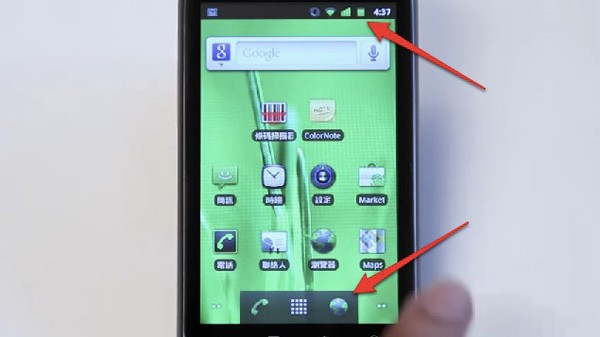
After Mr.Blurry Camera Man kept releasing snapshots of Google’s next Android release, we knew a none, more detailed description of 2.3 would eventually leak out to the public. Google has finally given us this in the form of a recent voice search demonstration video from Google Hong Kong, where careful watchers have spotted tell-tale signs of a Nexus One running our new sweet tooth craving. As you can see above, the previously white status bar has now turned to black along with new icons as well as a tweaked launcher bar at the bottom of the screen. Settings also reveal restyled buttons and (thankfully)a new tab in the Market app labled “Related”.

Posted in Brewology, Mobile | No Comments »

Gaia Manager v1.04.02 RC1 Released drizztbsd has released Gaia Manager v1.04.02 RC1. Gaia Manager is based off Open Manager and Sexy Manager. The difference? This one is packed with more features. Check out the full description for more information.

Added support for themes.
Note: The topic (BGG.PNG, and BGH.PNG highlight.png) must be placed in the folder:
“/ Dev_hdd0/game/GAIA01985/USRDIR /”
It will not be overwritten during an update manager.
License change for the manager who goes GPLv3.
Therefore, any change in a person must meet the GPLv3 license.

Download it from the Brewology Store or PS3 Homebrew Manager.

Posted in Brewology, PS3 | No Comments »

FBANext v1.0.0 Released fba360 team has released FBANext v1.0.0. This derivative of Final Burn Alpha (FBA) called FBANext-PS3 was first introduced in the xbox360. FBANext-PS3 is capable of emulating the following hardware: Capcom CPS-1, Capcom CPS-2, Capcom CPS-3, Cave, Neo Geo, Sega System 16 (and similar), System 18, X-Board, Y-Board, Toaplan, Taito and Psikyo 68EC020 based hardware.

FBANext-PS3 v1.0.0 Features:
- Full graphics/audio supported
- Easy to use rom browser
- Option to filter on specific drivers
- Option to hide clones
- Option to only display 3 or 4 player games only
- 60fps performance at 1080p for *most* roms
- Pixel Shader support
- Up to 4 gamepads supported
- Rotate screen options
- Hardware filter options (Linear, Point filtering)

Download it from the Brewology Store or PS3 Homebrew Manager.

Posted in Brewology, PS3 | 1 Comment »

PS3SX v0.1 Released Anonymous has released PS3SX v0.1. This is an emulator that allows you to play backed up PS1 games on your PS3. In order to use it you must obtain the PSX BIOS (SCPH1001.bin).

PS3SX PCSX port on PS3 using PS3 SDK and psl1ght it’s a hybrid for the pre-release. No source code will be available only when i completely port the emulator to psl1ght. Before xmas i will update it with a new GUI, save state, and cheat code.

You will also need to obtain the PSX BIOS (SCPH1001.bin) by some means, like Google. We won’t be hosting the BIOS here. Find that, download it and the PS3SX archive, follow the instructions and enjoy some crusty-looking PSX titles on your big screen!

PS3SX Pre-Release Features:
* 2 players
* All ISO formats
* PSX homebrew *.psx and *.exe
* Save works for player 1 & 2
* Sound support CDDA and XA
* Full screen
* Full speed

Download it from the Brewology Store or PS3 Homebrew Manager.

Posted in Brewology, PS3 | No Comments »

xttl has updated his PS3 Doom port to version v0.03 recently. The new version brings 1080p and 720p support, various other resolution support, analog controls, and sound is now properly working.

v3 is now out. Sound effects should work pretty much perfectly now, there’s a simple launcher that will allow you to select an IWAD if you have multiple ones available (no PWADs yet, and the launcher menu only lists the first 10 IWADs it finds which can happen if you have duplicates of them on different storage devices) and in case an error happens after graphics have been initalized, you’ll see the error message on screen. (not just via ethernet debugging if enabled).

I also switched the license to GPLv2 now (the DOOM source is available both under GPL and under another license that basically disallows any commercial use of the work, but allows you to withhold your sources). I had no intention to not release sources anyway, and this allows me to use code from other GPL’d ports. The 720p scaler in use now is from Chocolate Doom (though adapted to work with true transparencies instead of faking them with palette lookup tables) and 1080i/p is done using a similar idea.

v3 supported screenmodes: 1920×1080 and 1280×720. 640×480 and 720×576 STILL DO NOT WORK. Sorry! If you want to force 720p mode when you have 1080i or 1080p available, hold TRIANGLE immediately after you select PS3DOOM’s icon from XMB and keep it held down until the launcher WAD menu appears. This is a workaround until I can figure out a way to query available video modes using PSL1GHT. I don’t just want to assume a particular mode is available, and PSL1GHT’s videoTest example just selects the same mode XMB is running in, which is always the highest resolution available.

You may want to force 720p because the scaler in 1080i/p is a bit slow. ;-)

I also changed the controls to analog now.

Download Doom from the Brewology Store or here

Posted in Brewology, PS3 | No Comments » Tags: , , ,


Hey! You have a Facebook and want to be closer than ever with us? Well, head on over to our group page! It’s not much now, but soon, we’ll be providing a bunch of exclusive content through it, quick updates, and a bunch of other stuff!
Facebook Group: Here

Posted in Apple, Brewology, GFX, Mobile, NDS, PS3, PSP, Wii, XBox | 1 Comment » Tags: ,

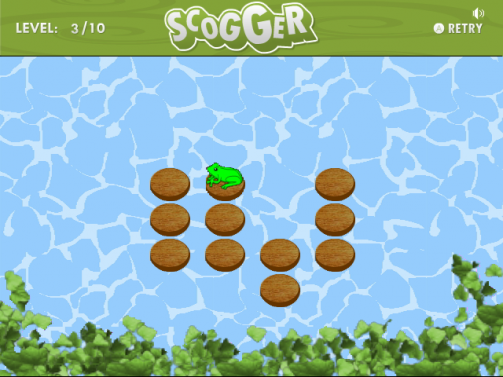
Scognito, creator of Sconsole and writer of the PSL1GHT Setup Guide has recently informed us via his twitter account about his current progress with his portation of scogger, which is already available on several other gaming devices, to the PS3. Scogger is a simple homebrew game where you control a frog and hop across tree trunks to solve a puzzle. There is currently no download yet available.

First playable scogger running on PS3! It lacks sound and still runs at 640×480. For now, The goal of the game is to make the frog jump over all the tree trunks. The only available direction the frog can move are forward, left and right (no diagonals), with no jump distance limit! Remember that the frog cannot jump backward!”

Author’s Twitter: twitter.com/Scognito

News Source: PSGroove.com – Homebrew – Scogger Running on PS3

Discussion thread: Homebrew – Scogger

Posted in Brewology, PS3 | No Comments »

I’ve got little words for this. Seems very legitimate.

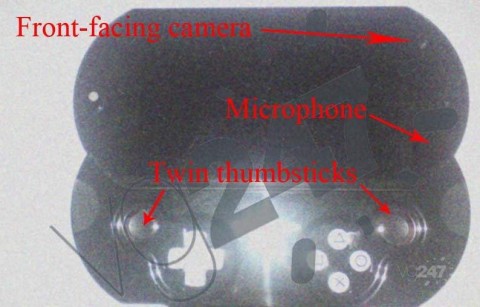
A while back, many companies started stating that they had the PSP2 in their hands, even though Sony denied it when confronted. Now, images are popping up of the test kit that the developers are saying that they’re testing. As you can see from this image, the PSP 2 will have a trackpad on the back, like it has been stated before, two analog sticks, two cameras, and a PSP Go-like body (actually looks more like the Mylo COM-1). Very little word has been put out about specs of the device, but it it said to rival the XBox 360 in graphics power in respect to screen size. Another rumor going along with this one is that the PSP 2 will come in two seperate models. One that is more like the PSP-1000 model and one like the PSP Go.

Discussion: Here

Source: Here

Posted in Brewology | 1 Comment » Tags: , , ,

Greg from PS3-hacks.com has confirmed that the PS Downgrade from the PS Jailbreak crew is real! Here is what he had to say:

“I can personally tell you that PS Downgrade is the real deal. I’ll attempt a video later — just know I successfully downgraded my PS3 Slim running 3.50 to 3.41 a few moments ago. And so we’re clear: ps-downgrade.com is not a scam; they’re the real deal — and very helpful too. I bought my PS Downgrade update for $40 and although it took more than 48 hours, they still delivered; I understand that to be PS Jailbreak’s problem but lets not get into he said she said. After all the PS Jailbreak team did it again!

We have for you the modified 3.41 PUP, both Lv2diag.self files, and the PS Updater app (to update your PS Jailbreak with PS Downgrade). Instructions on all that below. I believe the FLA file (the PS Downgrade software) is specific to each PS Jailbreak device. But I’ve included mine anyway. Maybe someone can do something with it.

How to Downgrade your PS3 with PS Downgrade

1. Insert PS Jailbreak device that has been reprogrammed as PS Downgrade into your console
2. Turn on the console using the same boot method as PS Jailbreak: Press power then immediately press eject. Your console will turn on and PS Jailbreak will light up with red/green LEDs followed by green only, then the PS3 will turn off.
3. Turn on console to make sure you are in factory service mode. You will see a huge red box on the screen saying Factory Service Mode. Once confirmed please turn off console and remove PS Downgrade Dongle.
4. Program any blank USB mass storage device with 2 files:
      1. the modified 3.41 PUP
      2. Lv2Diag.self (rename Lv2diag.self.1)
These must be the only files on the USB key and must be placed in the main (root) directory.
5. Insert this USB mass storage device into the USB port to the right — the first USB port in from the right side if you’re facing the console. Turn the PS3 on and you will see black screen but the PS3 HDD light will flash.
6. Wait 3 minutes for the system to install the old firmware. Towards the end the power button on the console will start flashing green and then your console will power off.
7. Remove the USB key and turn on the console, you will still be in factory service mode. Please verify you have downgraded successfully to version 3.41.
8. (Optional) – If you wish to downgrade to any older firmware you can follow step 4, 5, 6 using any regular firmware PUP. (You do not need to use modified custom firmware now that you are on 3.41).
9. Insert USB key back into your PC, remove the PUP and Lv2Diag.self file, and copy only the other LV2Diag.self (rename Lv2diag.self.2) to the USB key.
10. Power on your console, after 10 seconds it will power off
11. Turn on your console again with no USB inserted and you will be out of factory service mode and back in retail mode with your chosen firmware version installed

With this you’re able to downgrade any PS3 running firmware 3.42 or 3.50 and “beyond” … I wonder if Sony has any plans on revising their hardware soon. I suspect this is similar to Pandora’s battery for the PSP, which ultimately forced Sony to release the TA088v3 closing off that backdoor.

If you just can’t wait and you already own a PS Jailbreak, or if you want to buy a PS Jailbreak too, then you do that and you downgrade your PS3; you can buy the standalone update or both PS Jailbreak and software
at ps-downgrade.com. Otherwise sit patient because you know this’ll be open sourced real soon.”
Source: PS3-hacks.com

Posted in Brewology, PS3 | 4 Comments » Tags: , , ,

By popular request the Brewology Store has gone multilingual. Try choosing the language of your choice in the top right corner. We are not currently translating everything. So if you see something you want translated. Please let us know here or on the Brewology.com forums!

ALSO I would like to make a call to all developers. If you would like to manage your own Homebrew (pkgs / images / author / author url / description / etc…) on the Brewology Store please sign up on the forums and PM me. I will give you access to an admin panel to manage your own homebrew.

If you aren’t a developer but want to help sign up on the Brewology forums and help with questions or PM me or PuppetMaster if you want to help with the Store.

Posted in Brewology, PS3 | 1 Comment » Tags: , , ,

« Previous Entries Next Entries »