

|
Download it from the Brewology Store or PS3 Homebrew Manager. |
|
| Posted in Brewology, PS3 | 1 Comment » | |
 fba360 team has released FBANext v1.0.0. This derivative of Final Burn Alpha (FBA) called FBANext-PS3 was first introduced in the xbox360. FBANext-PS3 is capable of emulating the following hardware: Capcom CPS-1, Capcom CPS-2, Capcom CPS-3, Cave, Neo Geo, Sega System 16 (and similar), System 18, X-Board, Y-Board, Toaplan, Taito and Psikyo 68EC020 based hardware.
|
Download it from the Brewology Store or PS3 Homebrew Manager. |
|
| Posted in Brewology, PS3 | No Comments » | |
 Anonymous has released PS3SX v0.1. This is an emulator that allows you to play backed up PS1 games on your PS3. In order to use it you must obtain the PSX BIOS (SCPH1001.bin).
|
xttl has updated his PS3 Doom port to version v0.03 recently. The new version brings 1080p and 720p support, various other resolution support, analog controls, and sound is now properly working.
Download Doom from the Brewology Store or here |
|
| Posted in Brewology, PS3 | No Comments » Tags: doom, Homebrew, PS3, wad | |

 Facebook Group: Here |
|
| Posted in Apple, Brewology, GFX, Mobile, NDS, PS3, PSP, Wii, XBox | 1 Comment » Tags: Brewology, Facebook | |
|
Scognito, creator of Sconsole and writer of the PSL1GHT Setup Guide has recently informed us via his twitter account about his current progress with his portation of scogger, which is already available on several other gaming devices, to the PS3. Scogger is a simple homebrew game where you control a frog and hop across tree trunks to solve a puzzle. There is currently no download yet available.
Author’s Twitter: twitter.com/Scognito News Source: PSGroove.com – Homebrew – Scogger Running on PS3 Discussion thread: Homebrew – Scogger |
|
| Posted in Brewology, PS3 | No Comments » | |

|
I’ve got little words for this. Seems very legitimate.
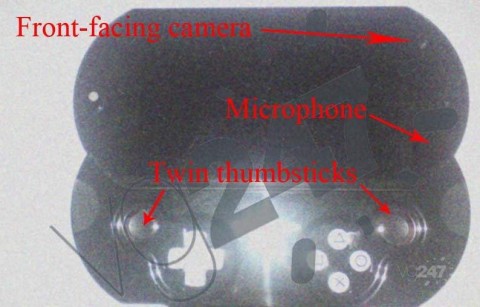
A while back, many companies started stating that they had the PSP2 in their hands, even though Sony denied it when confronted. Now, images are popping up of the test kit that the developers are saying that they’re testing. As you can see from this image, the PSP 2 will have a trackpad on the back, like it has been stated before, two analog sticks, two cameras, and a PSP Go-like body (actually looks more like the Mylo COM-1). Very little word has been put out about specs of the device, but it it said to rival the XBox 360 in graphics power in respect to screen size. Another rumor going along with this one is that the PSP 2 will come in two seperate models. One that is more like the PSP-1000 model and one like the PSP Go. Discussion: Here Source: Here |
|
| Posted in Brewology | 1 Comment » Tags: Mylo, PSP2, Rumors, sony | |

|
Greg from PS3-hacks.com has confirmed that the PS Downgrade from the PS Jailbreak crew is real! Here is what he had to say: “I can personally tell you that PS Downgrade is the real deal. I’ll attempt a video later — just know I successfully downgraded my PS3 Slim running 3.50 to 3.41 a few moments ago. And so we’re clear: ps-downgrade.com is not a scam; they’re the real deal — and very helpful too. I bought my PS Downgrade update for $40 and although it took more than 48 hours, they still delivered; I understand that to be PS Jailbreak’s problem but lets not get into he said she said. After all the PS Jailbreak team did it again! We have for you the modified 3.41 PUP, both Lv2diag.self files, and the PS Updater app (to update your PS Jailbreak with PS Downgrade). Instructions on all that below. I believe the FLA file (the PS Downgrade software) is specific to each PS Jailbreak device. But I’ve included mine anyway. Maybe someone can do something with it. How to Downgrade your PS3 with PS Downgrade
With this you’re able to downgrade any PS3 running firmware 3.42 or 3.50 and “beyond” … I wonder if Sony has any plans on revising their hardware soon. I suspect this is similar to Pandora’s battery for the PSP, which ultimately forced Sony to release the TA088v3 closing off that backdoor. If you just can’t wait and you already own a PS Jailbreak, or if you want to buy a PS Jailbreak too, then you do that and you downgrade your PS3; you can buy the standalone update or both PS Jailbreak and software |
|
| Posted in Brewology, PS3 | 4 Comments » Tags: downgrade ps3, ps downgrade, ps jailbreak, PS3 | |
|
By popular request the Brewology Store has gone multilingual. Try choosing the language of your choice in the top right corner. We are not currently translating everything. So if you see something you want translated. Please let us know here or on the Brewology.com forums! ALSO I would like to make a call to all developers. If you would like to manage your own Homebrew (pkgs / images / author / author url / description / etc…) on the Brewology Store please sign up on the forums and PM me. I will give you access to an admin panel to manage your own homebrew. If you aren’t a developer but want to help sign up on the Brewology forums and help with questions or PM me or PuppetMaster if you want to help with the Store. |
|
| Posted in Brewology, PS3 | 1 Comment » Tags: Homebrew, PS3, ps3 store, psn | |
|
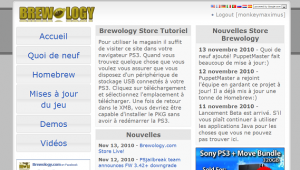
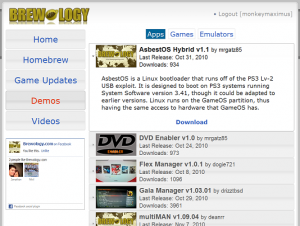
http://store.brewology.com allows you to download the latest Homebrew, Game Updates, Demos from your PS3 to install on your PS3. It also has videos that you can download or just watch in the page. To help further this project when you can’t find a game update please use the PS3 Homebrew Manager Java Applet as it will automatically add it to the store. If you find a PSN link you want to download that we don’t have please use the PSN Downloader and it will also be added to the store! Instructions: To use the store simply visit http://store.brewology.com in your PS3 Browser. When you find something you want make sure you have a USB storage device attached to your PS3. Click download and select the location to download to. Once back in the XMB you should be able to install the PKG without restarting the PS3. |
|
| Posted in Brewology, PS3 | 1 Comment » Tags: Brewology, PS3, ps3 store, psn, psn store, store | |
Source: psgroove |
|
| Posted in Brewology, PS3 | 6 Comments » Tags: downgrade, jailbreak, PS3, psjailbreak | |
| « Previous Entries | Next Entries » |