Meta 
Meta


You are currently browsing the Brewology weblog archives.

aldostools has updated 3 of his previously released tools as well as added 3 new ones.

Release notes are as follows:

mmTM_GUI 1.3.1 updated!
It’s a tool that verifies, pack and unpack multiMAN’s theme files (THM).
(supports drag & drop of THM file, THM file as command line, browse for THM file)

Changes: – Version 1.3 includes a verification template and auto-complete for paths. – Version 1.2 fixed a critical error in the mmTM_GUI that was creating corrupted THM files.
- Added create THM files right-clicking on folders

TXT to Links.xml 1.0 new!
It’s a tool to convert text files with URL to links for the XMB Manager+ 0.10-mod. All you have to do is put a text file with all the links (description and url in separate lines) and it will add the XML code to the Links.xml

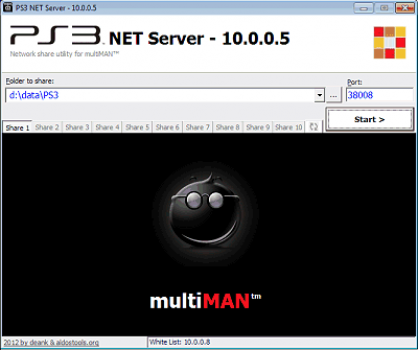
PS3 NET Server GUI 1.0 updated!
It’s an improved GUI for the PS3 NET Server (the PC side of multiMAN).
(hosts hide in system tray, remember last used folders, supports up to 10 hosts, white list, etc.)

PKG ContentID 1.0 new!
It’s a tool for view quickly the ContentID of a PKG. (It does more than that, please read the readme for details)

PARAM.SFO editor 1.0 new!
It’s a tool to edit PARAM.SFO files and the PARAM.SFX files created by “Create PS3_EXTRA” (see below).
(supports drag & drop of PARAM.SFO, PARAM.SFO as command line, browse for SFO/SFX file)

Create PS3_EXTRA 1.1 updated!
This tool scans for the PKG, MP4 and P3T files copied to each game folder, its PS3_UPDATE folder, PKGDIR or PS3_CONTENT, and store them under a PS3_EXTRA structure. It scans for the PKG, MP4 and P3T files copied to each game folder or its PS3_UPDATE folder, and store them under a PS3_EXTRA structure. When a game is mounted with multiMAN, there will be 2 BD icons on the XMB: one disc for the game itself and another with PKGs, MP4 and P3T. It should make it easier to install the game patches, DLC, fixes, and related videos.

PS3RIP 1.0
It’s a tool that should help you gain some space on your external HDD, removing unnecessary files.

renam 1.0
This tool, if copied to the GAMES or GAMEZ folder, will rename the games sub-folders from the default “BLUS0000-[Title]” format to “Title [BLUS0000]“.

Download the files or find out more here.

Posted in Brewology, PS3 | No Comments » Tags: , , , , , ,

multiMAN deanrr has released multiMAN v4.01.02.

* Added support for creating ISO/BIN+CUE images from PS2 CD and PS1/PSX CD *directly* to remote host
* Added automatic extraction of thumbnails after ISO/BIN+CUE is created (PS3/PS2/PSX/BD/DVD)
* Added support for displaying coverart/jacket for Blu-ray and AVCHD discs (if /HDAVCTN or /BDMV/META/DL folders contain jpg jacket-image)
* Added support for creating ISO files from folders to remote host (ISO is cached to internal HDD and then moved to remote host)
* Improved FTP transfer speed (up to 10MB/s over 100Mbit connection)
* Improved transfer speed from and to remote hosts (/net_host) (up to 10MB/s over 100Mbit connection)
* Improved scanning of remote host content folders
* Added support to set “External Game Data” for games/applications installed under /dev_hdd0/game or /dev_usb***/GAMEI (RELOAD.SELF required)
* Fixed few issues introduced in 04.01.01, related to displaying/refreshing Retro/Music/Photo columns

Download it from the Brewology Store

Posted in Brewology, PS3 | No Comments »

Returning this Friday, Verizon will again begin to double their data packages (all for the original price). This means the 2GB limit will be pushed back to 4GB, a great deal for those not grandfathered into a now unavailable Unlimited data package. The only stipulation? You must be a customer newly signing up under a 4G plan for a smartphone. This includes new customers as well as customers willing to extend their 2 Year prison sentence.

Posted in Brewology, Mobile | 2 Comments » Tags:

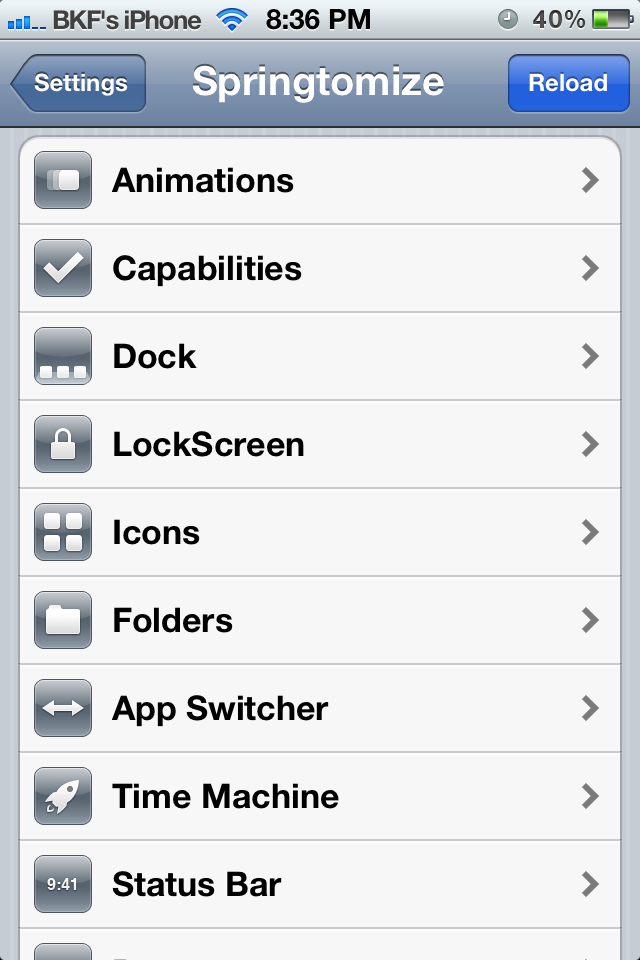
The main issue with any iOS device is the lack of originality between two devices. Without a case, which thus ruins the artistic design the masterful Jonathan Ive sculpted, or, say, your specific layout of the icons on the homescreen, two devices are almost indistinguishable at a glance. With Springtomize2, this problem is now in the past. Springtomize allows the customization of any basic feature of iOS, including animations, the dock, lockscreen, notification center, and much, much more.

Keep Reading

Posted in Apple, Brewology, Mobile | 6 Comments » Tags:

Music Banner is an all new jailbreak tweak. From the same developer who brought you the sought after Activator, RetinaPad, and Full Force, his new project Music Banner tweaks the notification bar to give you an iOS 5 style turntable of your Now Playing music.

Compatible: iOS 5 iPhone, iPod, and iPad
Source: BigBoss Repo

Posted in Apple, Brewology, Mobile | No Comments » Tags:

deroad has now developed SFO2SFX. Recently, there has been discussion of SFX files, and now their is a way to convert them from SFO files, using this tool he created derived from his SFO Reader.

Download here

Posted in Brewology, PS3 | No Comments » Tags: ,

rebug lv2 loader tool

The Rebug team released the tool LV2 Loader to aid developers working with the lv2_kernel.self.

LV2 Loader is a tool for devs to allow the quick testing of modified lv2_kernel.self by launching it from the root of dev_flash without the risk of bricking the PS3 or need for a flasher if the new kernel does not work.

The app will run on any 3.15, 3.41, 3.55 CEX or DEX firmware that has lv1 mmap and lv2 peek and poke patches. It also has udp_printf support which will return the offset of the lv2 boot path in lv1 and a little bit of info about what it is doing.

Check it out @ rebug.me/lv2-loader

Posted in Brewology, PS3 | No Comments » Tags: , , , ,

LED Change deroad has released LED Change v2.0.

deroad released a completely new version of the Led Changer for Jailbroken PS3 consoles. The app allows you to change the color of your system’s LEDs (the power light) and keep it also on the XMB or while playing games/homebrews.

Download it from the Brewology Store.

Posted in Brewology, PS3 | No Comments »

PsDev released a PS3Tools GUI edition over on psx-scene.com. Check out what he said below.

PsDev wrote:
FEATURES:

So some where around 20+ total things this multi ps3 tool can do
in to a ps3 file type of some sort in a faster time than any other program around, faster than the cmd line tools.
And the best thing is it’s really simple, 12 year old kids could do it.

HOW TO USE:

DOWNLOAD PS3Tools GUI Edition.rar

Follow me on twitter @ https://twitter.com/#!/RealPsDev

Posted in Brewology, PS3 | 1 Comment » Tags: , , ,

PlayStation 3 developer PS3Hen has released some updates regarding his Hybrid Firmware 4.0. This firmware mod requires a hardware flasher as well as a PlayStation 3 that is on custom firmware 3.55. With this release you will need to patch the firmware yourself with instructions below. Changes include the XMBFM ported by PS3Hen, released by DeViL303, PS2 game disk recognition and icon changes.

To Quote:

I’m not going to make you re-download another 180MB PUP file, Instead I’ve decided to release a patch which has all the tools required to patch my Version 2 pup to be Version 2.5 (although when the link for the version 2 pup gets taken down I’ll release a version 2.5 pup). The patch files can be downloaded here:

Just like before only retail signed .PKG can be installed with this. Have fun. THIS HFW WILL NOT ALLOW HOMEBREW!

Change Log: Version 2.5

  • Fix’s Custom Icons/labels not showing in-game
  • Using Version 0.07 of the XMB File Manager (ported to FW 4.00 by me)
  • PSN content waiting to be installed/copied now only shows in the (Playstation Network Content) sub menu of the XMB File Manager (I noticed the XMB File Manager used the wrong internal link to show PSN content so I fixed this)
  • PS2 game discs show as “Playstation 2 Format Disc” instead of “Unrecognised Data” on Non-BC PS3s
  • The XMB File Manager uses a custom icon(see picture)
  • The “Playstation Network Content” now uses a (IMO) better icon


How to install the 3.2 Update Patch:

  1. Install PS3MFW Builder v0.2.1
  2. Copy the ‘change_xml_files.tcl’ file to the ‘task’ folder of PS3MFW Builder
  3. Put my “modded FW 4.00(releasev2).PUP” as the “Original fw” and whatever you want as the “Modified fw”
  4. Uncheck every thing except “PS3HEN’s 4.00HFW Patch 1″
  5. In “PS3HEN’s 4.00HFW Patch 1″ link each file on the task page to the ones in the “Dev_flash files to be patched” folder in this package
  6. Select “Build MFW”


Download: PS3 4.00 HFW v2.5
Source: psx-scene.com

Posted in Brewology, PS3 | No Comments » Tags: , , , ,

« Previous Entries Next Entries »